
步驟提要 #
- 複製原專案資料夾、更名
- 移除新專案 舊Git遠端連結
- 上傳新專案到 GitHub,建立新 repository
- 忽略 /hugo.exe、/public/、/resources
- 連結到新的 GitHub repository
→若忘記忽略→ 4.5. 補忽略+刪除 - 驗證
- 部屬新專案
1. 複製專案資料夾 #
# 在專案的上層目錄執行
cp -r thWeb-cc_0730-25 thWeb-cc_0930-25
2. 進入新資料夾並移除舊的 Git 遠端連結 #
cd thWeb-cc_0930-25

# 查看目前的遠端連結
git remote -v

# 移除舊的遠端連結
git remote remove origin
3. 在 GitHub 上建立新的 repository #
- 前往 GitHub 網站
- 點擊右上角的 “+” → “New repository”
- Repository name 填入:
thWeb-cc_0930-25 - 選擇 Public 或 Private
- 不要勾選 “Initialize this repository with a README”
- 點擊 “Create repository”
4. .gitignore 設定忽略 #
從 GitHub Desktop 設定
GitHub Desktop → Repository → Repository settings...
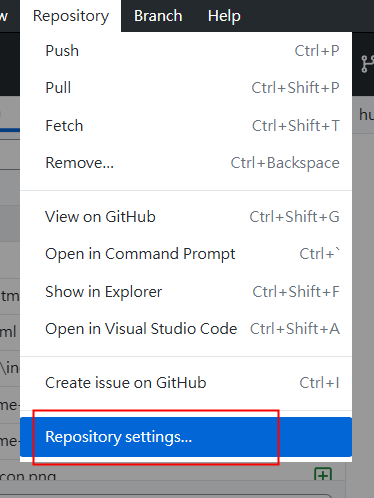
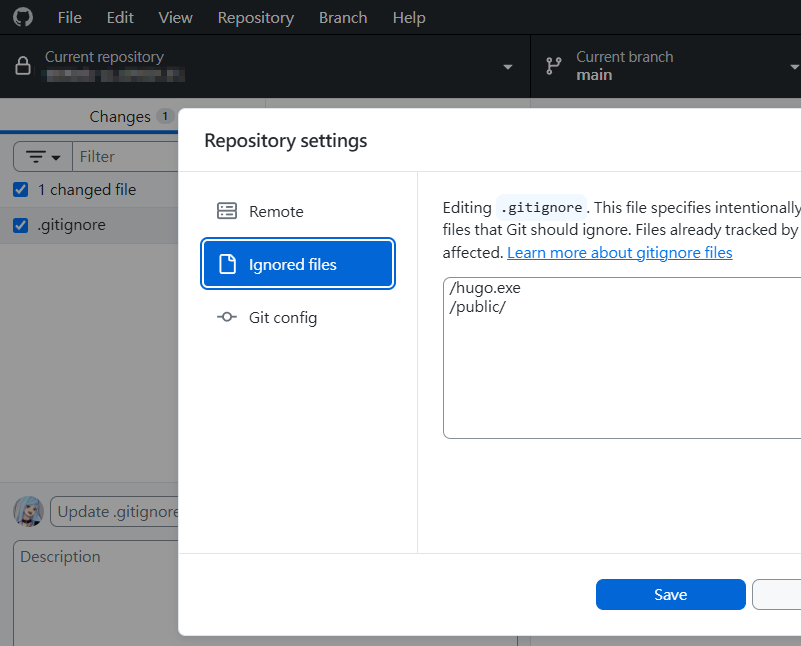
在 Ignored files 中,輸入/hugo.exe、/public/、/resources
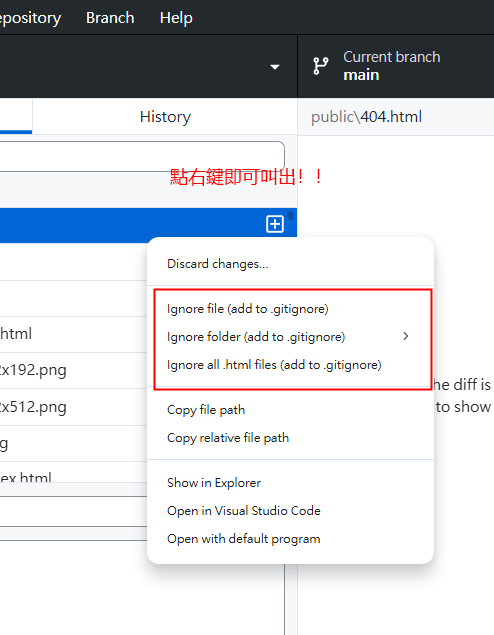
或 對檔案點選右鍵 → 選單 → Ignored file 在 Ignored files 中,輸入/hugo.exe、/public/、/resources
5. 連結到新的 GitHub repository #
# 添加新的遠端連結
git remote add origin https://github.com/thitaart/thWeb-cc_0930-25.git

# 推送到新的 repository
git push -u origin main
注意:如果預設分支是
master而非main,請將上面的main改成master。可以用git branch查看目前的分支名稱。
4.5. 補忽略+刪除 #
若發現上傳到/hugo.exe、/public/、/resources/
則需 先停止 git追蹤,再刪除雲端檔案
停止追蹤 hugo.exe 和 public/ #
# 1. 從 Git 追蹤中移除(但保留本地檔案)
git rm --cached hugo.exe
git rm -r --cached public/
git rm -r --cached resources/

# 2. 確認 .gitignore 內容正確
# 應該包含:
# hugo.exe
# /public/
# /resources/
# 若不正確 → 執行步驟4. 從GitHub Desktop中設定忽略

# 3. 提交這個「停止追蹤」的變更
git add .gitignore
git commit -m "Stop tracking hugo.exe, public and resource folder"

# 4. 推送到 GitHub
git push
從 GitHub 刪除這些檔案 #
上面的 git push 就已經完成刪除了!因為:
git rm --cached= 告訴 Git「不要再追蹤這些檔案」git commit+git push= 把這個「刪除追蹤」的動作同步到 GitHub- GitHub 上的 hugo.exe 和 public/ 會被移除
驗證是否成功 #
# 檢查本地狀態
git status
# 應該顯示:working tree clean
# hugo.exe 和 public/ 以及 resources/ 不應該出現在列表中

# 檢查 GitHub
# 去 GitHub repo 頁面看,hugo.exe 和 public/ 以及 resources/ 應該消失了
預期結果 #
- 本地:hugo.exe 和 public/ 以及 resources/ 資料夾還在,可以正常使用
- Git:不再追蹤這些檔案
- GitHub:這些檔案會被刪除
- 之後:無論怎麼修改這些檔案,都不會被 Git 偵測到
6. 驗證 #
# 確認遠端連結已正確設定
git remote -v
應該會看到:
origin  https://github.com/thitaart/thWeb-cc_0930-25.git (fetch)
origin  https://github.com/thitaart/thWeb-cc_0930-25.git (push)
完成後,就有兩個獨立的專案了:
thWeb-cc_0730-25→ 連結到舊的 GitHub repothWeb-cc_0930-25→ 連結到新的 GitHub repo